 BuilderLab
 Home / Shop / Flag Dash Compact
Flag Dash Compact
8×8 RGB flag and gear panel for SimHub
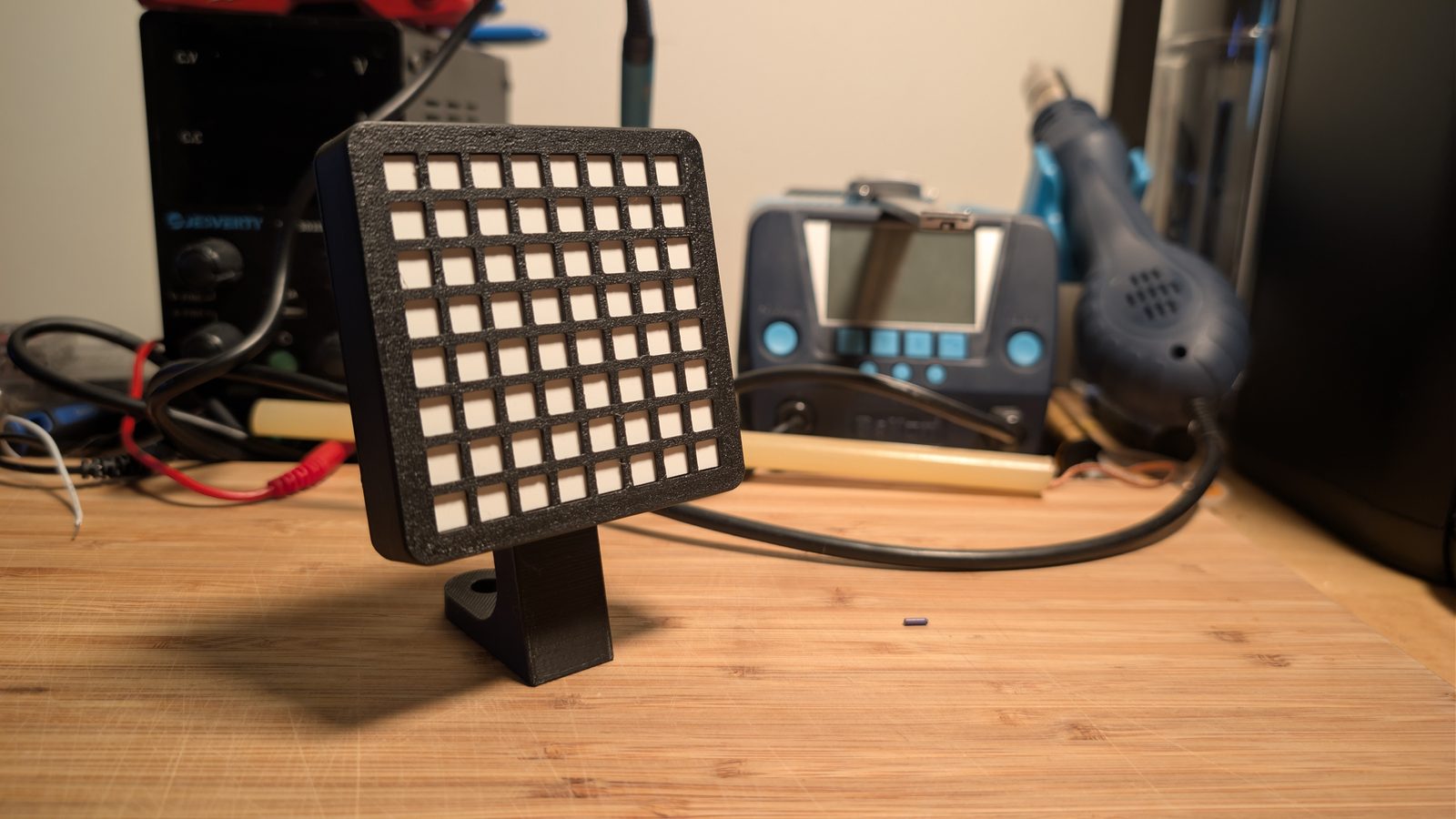
It's an 8x8 LED panel that shows flags and your gear. It sits off to the side, so you catch it without looking away from the screen. Plug it into USB, import the profile and you're set. No extra power supply.
Flags come first. If there's a yellow it shows the yellow, and the rest of the time it shows your gear. You've probably already got a screen full of numbers, so I kept this one simple.
Mine sits next to my wheelbase and mostly shows my gear. It's a normal SimHub matrix though, so if you'd rather have it show fuel or position or something else, you can set that up in SimHub. Everything is customizable. The profile I ship is just to get you started.
It also works with ATSR-Hub EVO, a separate SimHub plugin with a lot more effects and animations. That one isn't mine. It's free with an optional membership, and I've run it on this panel and use it on my dedicated Flag Matrix. It also does animations on your wheel if you have one with RGB LED buttons.
It's 78 mm square and 16 mm deep. The mount is one printed piece. An M8 bolt holds it to your rig and an M5 holds the panel on.
What turns up
- The panel, built and tested for an hour
- The 15° slim mount, printed here
- An M8×16 bolt, washer and roll-in T-nut for an 8 mm slot
- An M5×16 bolt for the panel
- A USB-C to USB-A cable
- A card with your serial number and what to do next
The SimHub profile is a download so you always get the latest one.
What you'll need
- SimHub on your PC, which is free
- A spare USB-A port or type-c to type-c
- 40-series extrusion with an 8 mm slot. The bolt and T-nut are in the box. On a 10 mm slot the M8 bolt still fits and you'd use your own T-nut
Other mounts
The slim mount in the box angles the panel 15°. There's also a tall one that sits about 30 mm higher, and a straight (no tilt) version of both. If you want me to print one of those, just mention it when I email you.email me your order number and which one. If you have a printer, the files are free on the Downloads page.
- LEDs
- 64 addressable RGB (WS2812B), 8×8
- Diffuser
- Milky white film, 0.55 mm, over a printed grid
- Housing
- Printed here
- Power
- One USB cable. Current is capped in the firmware so it runs from the port alone
- Mount
- Slim mount with a 15° tilt, one M8 bolt to your rig, one M5 to the panel
- Works with
- SimHub (profile included), ATSR-Hub EVO
- Size
- 78 × 78 × 16 mm panel, 110 mm corner to corner
- Serial
- Numbered, broken in, written down
Pre-order
All orders are by hand, going out in . Leave your email and I'll email you when yours is ready and let you know shipping then. You don't pay anything now, and I'll only email you about this.
Or just email me: support@builderlab3dp.com
Order one
Checkout goes through Stripe. It ships . I'll email you when it's on the way.
Buy one — CAD $69Questions first? support@builderlab3dp.com
Shipping to the USA is subject to approval due to changing tariffs. Email me at support@builderlab3dp.com before ordering.
In the US?
It's US$ with the import duties already paid, so there's no surprise bill at your door. Shipping gets added at checkout.
Buy one (US) — US$Build it yourself
Got a printer and a soldering iron? The DIY build pack is everything I use to build these, for CAD $15. It's a download, so it works anywhere.
- The print files for the case, grid, back plate, film template and all four mounts
- A step by step build guide with the parts list and wiring diagram
- How to add the one firmware line that keeps it inside what a USB port can handle
- The SimHub profile
You buy the LEDs and the board yourself. The parts list says what to get.
Get the build pack — CAD $15Everything it shows
Click through them. It's the same 8x8 layout as the real thing, without the diffuser softening it.
- Green — race started, or the track's clear again
- Yellow — caution, something ahead
- Blue — faster car coming, hold your line
- White — start of the last lap
- Black — warning, or a penalty to serve
- Checkered — session's over
- Gear — what it sits on the rest of the time
Demo Flags
How these get tested
I can't beat a factory on price. What I can do is test every one before it ships and keep a record of it.
Before it goes together
- Every LED matrix goes on a test jig before it goes in a case. If there's a dead pixel, a wrong colour or any flicker, I don't use it.
- Red, green and blue get checked separately. An LED with a weak red can still look white with all three on, then show the wrong colour down the road.
- I check every connection with a meter before it gets power for the first time, so a wiring mistake doesn't fry the LEDs.
Once it's a panel
- Then it runs for an hour on my break-in test, through SimHub's firmware and on the same cable you get. The first 40 minutes replay a real race lap from Bathurst with the flags and gear changes, while the brightness goes up in steps to full. The last 20 minutes are the heaviest patterns at full brightness.
- If it freezes, resets or drops off USB even once, it fails. I fix it and run the full hour again.
- Every flag gets turned on and then off again. SimHub only sends the LEDs that changed, this is how I catch a stuck one.
Most LED and solder problems show up in the first hour of use, so that hour happens here instead of on your rig.
The card in the box
Every panel gets a serial number. The card in the box has that number and everything I checked. I keep a copy along with the break-in results, so if something goes wrong, send me the number and I can look up when I built it, which batch of LEDs it used and how its test went.
Records go back to SN0001.
Please don't re-flash it
The firmware is SimHub's, with one extra line that limits how much power the LEDs can pull. That's what lets it run off one USB cable. If it gets re-flashed with SimHub's normal firmware that line is gone, and a bright flag at full brightness can pull too much power and freeze the panel.
If that happens it's not a defect and your warranty is fine. Email me and I'll help, or grab the firmware fix, which walks you through adding the line back. There's nothing in it that runs on its own.
Make your own effects
The panel is a normal SimHub matrix, so you can draw your own animations. The free Matrix Effect Builder lets you draw them, test them against pretend game data and copy the code into SimHub.